 Qrop
QropIntroducing QR code tracking on Qrop
By Qrop Team ·
We're building QR code tracking directly into Qrop, and it's close to launch. Instead of stopping at a generated image, a trackable code will route through a Qrop-owned redirect, so every scan gets logged, and the destination stays editable long after the code is printed.
This article walks through what the feature does, how it fits into the generator you already use, and what to expect on price and rollout. Nothing here requires you to do anything today, tracking will appear as an option in the generator and a new tab in your dashboard once it's live.
If you're new to the idea of scan tracking generally, not just Qrop's version of it, the qr-code-tracking-for-business guide covers what tracking data actually tells you and when it's worth paying for. This article is the product-specific one: what Qrop is building, and how it will work end to end.
How a trackable code works
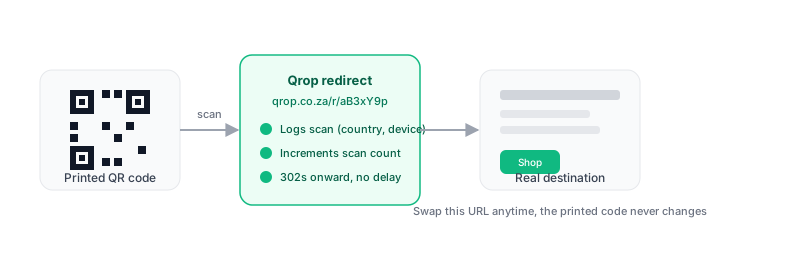
A normal QR code encodes its destination directly: scan it, and your phone opens that exact URL. A trackable code encodes a short Qrop redirect link instead, something like qrop.co.za/r/aB3xY9p. When someone scans it, the redirect logs the scan, then forwards them on to the real page in well under a second. Nothing about the experience changes for the person scanning.
That one extra hop is what makes everything else possible: a scan count that updates in real time, a destination you can change without reprinting anything, and analytics you can actually look at instead of guessing whether a flyer worked.
Turning on tracking in the generator
Tracking will live as a toggle directly in the existing QR generator: 'Make this trackable', shown only to accounts with purchased credits or a plan, and only for URL codes. Turn it on, and two more choices appear: how long the tracking link should stay active (a dropdown from 1 day up to 120 days, 30 days by default), and which campaign, if any, to file the code under.
Everything else about generating the code stays the same, colours, logo, module shape, output format. The only difference is what gets encoded: instead of your destination URL, the QR now encodes the redirect link, and generating it also creates the tracked-code record behind the scenes in the same request.
What the dashboard shows
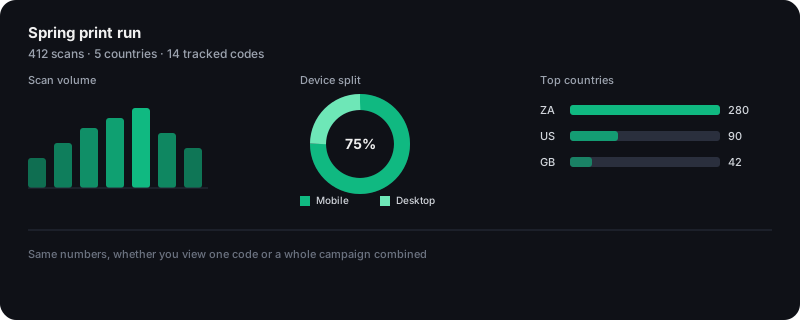
A new Tracking tab in the dashboard lists every code you've created: current scan count, when it was last scanned, whether it's active or paused, and which campaign it belongs to. From that list you can pause a code, edit its destination for free at any time, renew it before it expires, or export its full scan history as a downloadable file.
Group related codes into a campaign, a print run, an ad placement, a trade show, and the campaign view rolls their numbers together: total scans, a day-by-day timeline, a device split between mobile and desktop, a ranked list of scanning countries, and a leaderboard of which individual code in the group is pulling the most traffic. Country and device are the only signals collected; there's deliberately no IP address stored and no way to identify an individual visitor from the data.
Editing and renewing after it's printed
- Change the destination whenever you want, at no extra cost, the tracking charge pays for the redirect window, not for locking in one URL.
- Pause a code without deleting it, useful for a seasonal campaign you'll want to reuse next year.
- Renew a code before it lapses to push the expiry date forward and keep collecting scans, from the same duration dropdown used at creation.
- Once a code actually expires, it can't be revived, a new one has to be generated with a new short URL. Renewing ahead of the deadline is the way to keep continuity on a code you're already using.
Cost and rollout
Tracking will cost one flat credit on top of the normal generation cost, charged again each time you renew. That's it, no separate subscription tier and no scaling by how long the link stays active. If you're on a metered API plan, tracked codes draw from the same included credit pool as any other generation, no separate line item.
Tracking is scheduled to go live on Tuesday, 1 September 2026. Between now and then, we're running the last of the checks that matter most for a public redirect route, real-traffic load testing chief among them, since that's the one part of Qrop that has to stay fast and correct for as long as a printed code is out in the world.
Until launch day, the generator will show tracking as an option with a 'not yet available' note. No action is needed on your part, the toggle will simply start working once the switch flips.
Frequently asked questions
When is QR code tracking launching?
Tuesday, 1 September 2026. The feature itself is already built, what's left before then is a real-traffic check on the redirect route, since that's the part of Qrop that has to hold up under real scan volume the moment printed codes start pointing at it.
Will tracking cost extra?
Yes, one flat credit per tracked code, charged again on renewal, on top of the normal generation cost. Editing the destination of an already-active code is free. There's no separate subscription tier for tracking.
Do I need a paid plan to use tracking?
You need purchased credits or an API plan. Tracking is not available for anonymous generations or free accounts, since a tracked code is a permanent resource tied to an account, not a one-off image. Once you have credits or a plan, it draws from them like any other generation.
Can I use tracking through the API, not just the dashboard?
Yes. The same tracked-code and campaign endpoints available in the dashboard will be exposed on the enterprise API for subscribers, so bulk or automated tracked-code creation works the same way your other API-driven generation already does.
What happens to my scan data over time?
Scan history is kept for one year from when the code was created, independent of how many times you renew the link itself. You'll get advance reminders as that date approaches, with an export option so you can save the numbers before they're cleared.
Is this the same as a dynamic QR code?
It's the same underlying mechanism, an editable redirect, with analytics layered on top. See the dynamic vs static QR codes guide for how the redirect approach itself works if you want the destination to stay editable but don't care about scan analytics.
Related guides
Ready to create your QR code?
Generate a free QR code in seconds: custom colours, logos, and PNG, SVG or PDF output.
Open the generator