 Qrop
QropQR code campaigns: track a whole print run at once
By Qrop Team ·
A single tracked QR code answers one question: did this specific code get scanned? That's useful, but most real print runs aren't one code, they're a dozen. A product line with a code on every SKU. A trade show booth with a code at three different tables. A seasonal flyer running in five neighbourhoods at once. Looking at each of those codes' scan counts one at a time misses the question that actually matters: how did the whole thing do, and which part of it pulled its weight?
That's what a campaign is for. It's a way to group related tracked codes so their scans roll up into one combined view, with the individual codes still there to drill into when the combined number tells you something worth investigating further.
This article covers what a campaign actually groups together, what the combined dashboard shows, and three concrete situations, a trade show, a multi-location retailer, and a seasonal print run, where grouping codes changes what you'd otherwise decide. If you haven't read about tracked codes generally yet, the introducing QR code tracking on Qrop guide covers the redirect mechanism a campaign builds on.
What a campaign actually groups together
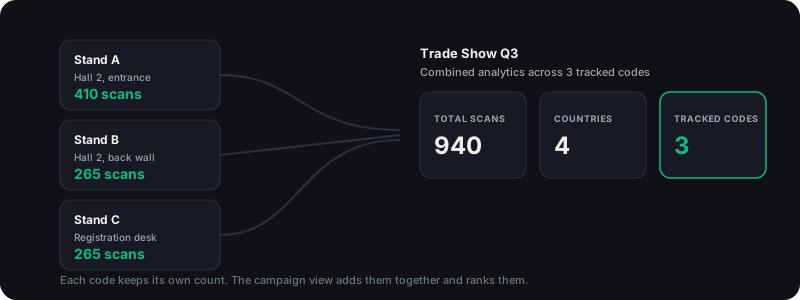
A campaign is a label you attach to a set of tracked codes, nothing more structurally complex than that. Creating one doesn't create new codes or change how any existing code behaves; it just gives a group of them a shared name so their numbers can be viewed together instead of one dashboard row at a time.
That grouping is deliberately loose. A code can belong to at most one campaign at a time, but you can move it into a different campaign later, or take it out of one entirely, without affecting the code itself or losing any of its scan history. Deleting a campaign doesn't delete the codes inside it either, it just ungroups them; nothing about the printed codes in the field or their redirect links changes.
What the combined dashboard shows
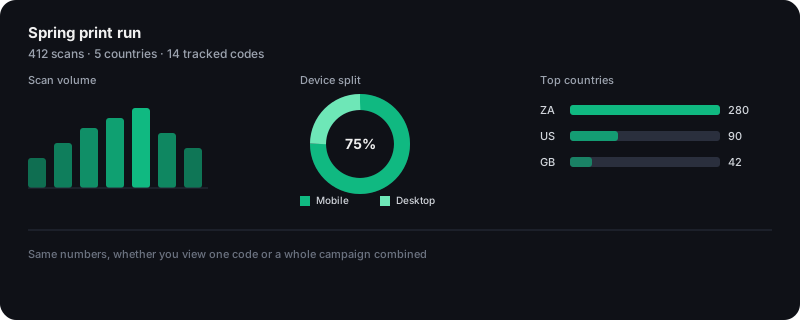
Open a campaign from the Tracking tab in your dashboard and you get the same shape of analytics a single code shows, a scan-volume timeline, a device split between mobile and desktop, a ranked list of scanning countries, only computed across every code in the group at once. Total scans and total code count sit at the top so you can see the campaign's overall size before drilling into anything else.
Below the combined numbers is a per-code leaderboard: every code in the campaign, ranked by scan count, so you can see at a glance which individual placement is carrying the campaign and which one nobody's scanning. That's usually the more actionable view than the combined total on its own, a campaign doing 900 scans tells you it's working; the leaderboard tells you where.
Setting one up
- From the Tracking tab in your dashboard, open Campaigns and create a new one with a name that describes the run, not the product, something like 'Spring print run' or 'Trade show 2026' rather than the item being promoted.
- Assign codes to it either as you generate them (a campaign dropdown sits next to the tracking toggle in the generator) or afterward from the Tracking list, where each existing tracked code can be reassigned to a different campaign at any time.
- Print and distribute the codes as normal. Nothing about the QR code itself, its colours, its logo, the redirect it points to, changes because it's part of a campaign.
- Check the campaign view as scans come in. Because campaign membership can change after the fact, the combined numbers always reflect whichever codes are currently in the group, not a fixed snapshot from when it was created.
Three situations where grouping changes a real decision
- Trade show, three booth locations: three tracked codes, one at the entrance table, one at the back wall, one at the registration desk, all in a 'Trade Show Q3' campaign. The combined total tells you whether the show was worth the stand fee at all; the leaderboard tells you the entrance table pulled twice the registration desk's scans, worth knowing before booking the same layout next year.
- Multi-location retailer, five store branches: a tracked code on the till-point signage at each branch, grouped into one campaign. A branch sitting well below the others in the leaderboard is a concrete, specific thing to investigate: is the signage missing, badly placed, or is foot traffic at that branch genuinely lower, rather than a vague sense that 'one store seems quieter'.
- Seasonal print campaign across neighbourhoods: a flyer run distributed to five different suburbs, each with its own tracked code, grouped for the season. Renewing the campaign next year with the same structure lets you compare this year's per-neighbourhood leaderboard against last year's, rather than starting the comparison from nothing.
Campaigns through the API
Everything described above is also available on the enterprise API for subscribers: /api/v1/campaigns to list or create a campaign, and /api/v1/campaigns/{id}/analytics for the same combined totals, timeline, and per-code breakdown the dashboard shows. That matters for a business generating tracked codes programmatically at volume, a marketplace stamping a unique tracked code on every seller's listing within one campaign per seller, for example, without anyone touching the dashboard by hand.
Campaign export bundles every member code's data into a single downloadable file too, useful for a monthly reporting cycle where the raw numbers need to sit in a spreadsheet or a business intelligence tool rather than the dashboard itself.
Who this is actually for
Campaigns need an account with purchased credits or a plan, because tracked codes are a permanent resource tied to an account rather than an anonymous one-off image, and the underlying tracking credit applies the same way whether a code sits inside a campaign or on its own. There's no separate charge for grouping codes together; the campaign itself is free to create, rename, or delete.
A single code running on its own doesn't need a campaign wrapped around it, that's just extra bookkeeping for one data point. Campaigns start earning their keep at three or more related codes running at the same time, and get more valuable the more of them there are: five codes are easy to compare by eye, fifty codes across a franchise or a national print run genuinely need the combined view to be readable at all.
Frequently asked questions
Does creating a campaign cost anything?
No. Creating, renaming, or deleting a campaign is free; it's a grouping label, not a resource with its own tracking cost. You still pay the usual flat tracking credit per code when a code is created or renewed, exactly as you would if it weren't in a campaign at all.
What happens to my codes if I delete a campaign?
They're detached, not deleted. Every code that was in the campaign keeps working exactly as before, its redirect, its scan history, its expiry date, all unchanged. Deleting a campaign only removes the grouping label, so the codes just show up as ungrouped afterward.
Can one tracked code belong to more than one campaign?
No, a code belongs to at most one campaign at a time. You can move it into a different campaign later, which is useful if a code originally created for one print run ends up being reused for a different one.
Do I need a paid API plan to use campaigns, or does the dashboard work too?
The dashboard version works on any account with purchased credits or a plan, no API plan required. The /api/v1/campaigns endpoints are for subscribers who want to create and analyse campaigns programmatically instead of through the dashboard UI, useful at volume, not required to use the feature at all.
How many codes can go in one campaign?
There's no fixed cap on campaign size itself. In practice, campaigns are most useful somewhere between three and a few dozen codes, small enough that the per-code leaderboard stays readable and specific to one actual print run, event, or placement test rather than becoming a catch-all for every code an account has ever created.
Does grouping codes into a campaign change how scans are counted for each code individually?
No. Each code's own scan count, timeline, and history are computed exactly the same whether or not it's in a campaign. The campaign view only adds a second, combined layer on top, it never changes or merges the underlying per-code data.
Related guides
Ready to create your QR code?
Generate a free QR code in seconds: custom colours, logos, and PNG, SVG or PDF output.
Open the generator